By Remi Bennett · Humanoid robot data · · 30 min read
Egocentric Data Collection Devices for Robot Learning: 10 Companies Compared
The most useful question about an egocentric data recorder is what survives the recording. A product may advertise fast cameras, synchronized motion sensing and hand tracking, yet the files delivered to a training pipeline can contain a different frame rate, estimated rather than measured motion, or no hand tracks at all. GenRobot's public DAS Ego sample makes that distinction concrete: its six camera streams can be decoded, but the hand-tracking topics described in the current guide are absent from that particular processed recording.8310
For teams choosing hardware, I would start with the supervision the task needs. The comparison below separates documented saved modes from sensor specifications and marks missing evidence rather than filling it in. A higher camera count is not necessarily the answer; sometimes the decisive feature is a usable gaze stream, a near-field view of both hands, or simply files that can be decoded without a vendor's private tool.
This is a comparison of ten companies offering integrated wearable collection systems, not ten camera models. A complete head-and-wrist or backpack rig qualifies; a bare camera that someone could attach to a helmet does not. Product variants remain under their manufacturer. Sources, prices and access terms were reviewed on September 21, 2026. This is a documentation, code and sample-file investigation, not a hands-on hardware test or a claim that every system has demonstrated better robot-policy performance.
Contents
- Start with the recording, not the sensor
- Compare the ten systems
- Meta: Project Aria
- GenRobot: DAS Ego
- FrodoBots: RoboCap
- Panoculon: Trinet
- Lumos: Ego STD and Lite
- Virdyn: VDEgo-C2
- Looper: Insight Data Acquisition Package
- Orbbec: the EGO collection kit
- Tobii: Pro Glasses 3
- Pupil Labs: Neon
- Choose by the task you need to teach
- The acceptance recording before a fleet order
- Sources
Start with the recording, not the sensor
Three kinds of numbers appear on these product pages, and they answer different questions. A sensor specification describes a component's capability. A recording profile defines the streams enabled together and their saved settings. A derived output describes what software estimates from those streams. Aria's predefined profiles are unusually explicit about the distinction: Gen 2 profile10 records RGB at 30 Hz, eye-camera video at 5 Hz and produces eye-tracking estimates at 30 Hz. None of those rates is interchangeable.100
That matters for imitation learning. Seeing someone grasp a cup supplies visual evidence of a demonstration, but it does not itself specify a robot's action space. The GazeVLA researchers used Neon recordings and recovered hand trajectories through HaWoR; the hands were downstream pose estimation, not an extra sensor stream built into the glasses.114 Treat the resulting trajectories as estimates to validate before motion retargeting, not ground-truth robot commands.
I would therefore compare systems along a chain: wearable setup → simultaneous recording mode → timestamped files → calibration → derived labels → robot training. The table is deliberately willing to say “not documented.” A missing public file schema does not prove a device cannot produce good data, but it does move integration risk from a specification sheet into your pilot.
Compare the ten systems
“Documented” below means a first-party recording description, not an independent throughput test. “Sensor spec” means the published number has not been established as a saved, simultaneous multi-stream profile. Prices are listed offers, not tax-inclusive delivered quotes; inquiry-only does not mean unavailable.
| Company and integrated system | Video and evidence level | Other streams | Recording and export path | Cost and access |
|---|---|---|---|---|
| Meta — Aria Gen 2 Research Kit | Documented profile10: RGB 2016 × 1512 at 30 Hz; CV 512 × 512 at 30 Hz; H.265. Profile [100] | IMU 800 Hz; eye video 5 Hz; estimated gaze and hands 30 Hz; VIO 10 Hz. Streams [100] | VRS recordings; tools export on-device perception to CSV/JSONL. Recording [101]; exports [129] | Partner application; no public numeric kit price verified. Access [112] |
| GenRobot — DAS Ego | Six 1600 × 1300 H.264 streams at approximately 30 Hz in the inspected vendor sample. Sample MCAP [83] | Documented IMU 200 Hz, audio, calibration; VIO and hand tracks are processing outputs. Data guide [10] | MCAP on SD; public protobuf definitions and processing tools. Sample has schema and topic caveats. Manual [4] | Sales inquiry; current hardware price not verified. Purchase route [18] |
| FrodoBots — RoboCap RS | Six-camera 1080p/30 fps advertised; native six-video layout documented, not sample-tested here. Device [3]; format [82] | Dual 6-DoF IMUs at 200 Hz; optional wrist sensors; calibration. RS specifications [15] | MP4 plus SQLite IMU files; first-party converter to MCAP. External power bank. Converter [22]; operation [12] | US$799 conditional GSI launch offer; US$899 regular listing. Early-October shipment promise for launch offer, not verified stock. Terms [15] |
| Panoculon — Trinet head and wrist kit | Documented FHD at 30 fps per Trinet; 150° horizontal field of view. Stereo variant needs its own mode confirmation. Recording [2] | 9-DoF IMU 400 Hz; stereo audio; vendor claims approximately 1 ms typical cross-camera sync for wrist kit. Kit [2] | UVC with in-band IMU/timestamps via SDK, or microSD recording with external power; public file schema not verified. Interfaces [2] | Contact for head-camera, wrist-kit and stereo pricing. Access [2] |
| Lumos — Ego STD / Lite | Sensor specs: RGB 1280 × 1280 at 60 ± 1 fps; four SLAM cameras 640 × 480 at 30 fps. Saved profile unverified. Specifications [1] | IMU 500 Hz; hand-joint estimates; STD-only ToF 320 × 240 at 30 ± 1 fps. Variants [1] | PC/workstation-dependent USB capture; Ubuntu SDK and ROS/ROS2; native container not established. Workflow [1] | Purchase and partnership inquiry; no public price verified. Inquiry [6] |
| Virdyn — VDEgo-C2 | Binocular RGB; numerical C2 recording resolution and fps not established. Device [92] | Timestamped IMU, audio and camera/IMU calibration; numerical IMU rate not established. Output [93] | microSD, physical button and Web UI; custom package, Decompression API, MP4/H.265 and offline trajectory tool. Workflow [93] | US$1,100 displayed; presale banner means fulfillment needs confirmation. Listing [93] |
| Looper — Insight Data Acquisition Package | Head and two hand views; simultaneous RGB/depth capture described, numerical saved modes not published on package page. Package [94] | IMU and VIO pose; multi-camera alignment and trajectory processing. Software [94] | Jetson Orin NX, NVMe SSD, V-Mount battery backpack; ROS 2 bags, images, depth maps, poses and metadata. Components [94] | Brochure/inquiry route; package price and final configuration unresolved. Access [94] |
| Orbbec — Dual-EGO / Quad-EGO kit | Two/four fisheye cameras; spec 1600 × 1200 at 60/30 fps. Vendor capture test, not independent saved-file validation. Specifications [95] | 6-axis IMU: Dual 400/1000 Hz; Quad 400/800/1000 Hz. Depth only in equipped RGB-D configurations. Configurations [95] | SDK/API and project-specific export support; native EGO container, codec and storage workflow not established. Integration [95] | Contact for standard kit or custom hardware; final form/configuration may vary. Access [95] |
| Tobii — Pro Glasses 3 | Documented scene video 1920 × 1080 at 25 fps, H.264. Specifications [104] | Gaze 50 or 100 Hz by edition; accelerometer/gyroscope 100 Hz, magnetometer 10 Hz; mono audio. Streams [104] | Body-worn SD recorder; MP4 plus gzip-compressed JSON-lines data, recording.g3 manifest and HTTP API. Developer guide [127] | Quote-only; controller included, API free, Pro Lab additional. Confirm integration license. Product [104]; API [105] |
| Pupil Labs — Neon wearable system | Documented scene video 1600 × 1200 at 30 Hz; eye video 192 × 192 per eye at 200 Hz. Streams [116] | Gaze up to 200 Hz in real time, full-rate cloud recomputation when required; IMU 110 Hz; optional audio. Rates [116] | Frame plus companion phone; native binary recordings or CSV/MP4 through Cloud/Neon Player. Formats [109] | From €6,250; academic €5,515 advertised. Check phone, taxes and delivered configuration. Pricing [107] |
Meta: Project Aria
Aria is the strongest starting point here for a research team that wants to choose a documented combination of visual, inertial and perception streams rather than negotiate what a recording contains. The current Research Kit combines Gen 2 glasses with a companion app, Client SDK, Aria Studio, Project Aria Tools and perception services. Access remains a rolling application for selected partners, with no public numeric kit price verified; this is not a normal retail purchase.112
For manipulation-oriented recording, Gen 2 profile10 is the useful concrete comparison. It specifies RGB at 2016 × 1512 and 30 Hz; CV camera streams at 512 × 512 and 30 Hz; and eye-camera video at 200 × 200 and 5 Hz. Those video streams use H.265 with constant-QP encoding, QP 22. IMUs run at 800 Hz, while the profile lists estimated eye tracking and hand tracking at 30 Hz and visual-inertial odometry, or VIO, at 10 Hz. Audio is 16 kHz Opus at 256,000 bps.100
The same predefined profile also specifies magnetometer 100 Hz, barometer 50 Hz, GPS 1 Hz, PPG 128 Hz, temperature 1 Hz and ambient-light sensing 10 Hz. BLE scanning is scheduled every 30,000 ms for 2,000 ms, Wi-Fi active scans every 30,000 ms and device information every 30,000 ms. These settings belong to the profile as a whole; they should not be combined with another profile's larger RGB resolution and presented as one supported mode.100
For example, profile8 records larger 2560 × 1920 RGB images but at 10 Hz. A task involving faster hand motion might favor profile10; a slower scene-understanding study might prefer the extra pixels. That is an editorial choice to test, not evidence that one profile produces better policies. Meta explicitly recommends predefined profiles and warns that custom combinations can compromise thermal behavior, data completeness and tooling compatibility.100
Recordings download as VRS containers.101 The Gen 2 perception exporter writes files including slam/open_loop_trajectory.csv, slam/online_calibration.jsonl, eye_gaze/generalized_eye_gaze.csv and hand_tracking/hand_tracking_results.csv. These are interpretable outputs for downstream work, but they remain perception results rather than direct measurements of robot action.129
Aria also has direct robot-learning relevance: Meta's account of EgoMimic describes human recordings used in robot co-training, and the EgoVerse paper identifies Gen 1 as its academic collection platform.113102 Those results motivate the workflow, but do not validate Gen 2 profile10 as the exact hardware configuration used in those experiments. Keep the generation in the dataset manifest.
GenRobot: DAS Ego
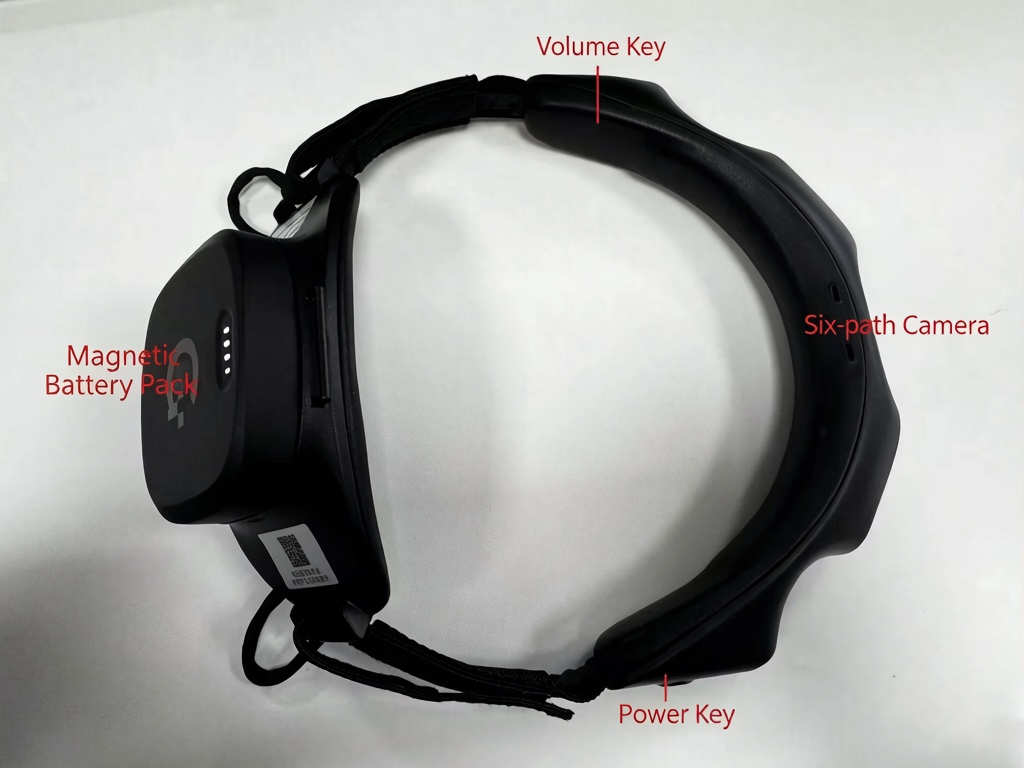
DAS Ego is interesting because its documentation reaches beyond a list of sensors into the files a robotics engineer would actually parse. The head-mounted system has six RGB cameras, inertial sensing and audio, with raw data recorded to SD in MCAP. The current product page specifies global-shutter 1600 × 1300 video at 30 Hz, and the manual describes roughly 270° horizontal by 150° vertical coverage across the array.174
The public processed sample provides a limited but useful check. Inspection of its encoded camera payloads confirmed six 1600 × 1300 H.264 streams; their MCAP header timestamps indicate approximately 30 Hz. Reading a nominal frame-rate field from the extracted H.264 alone would have been misleading: the recorded timing, not an elementary-stream guess, is the relevant evidence. This was one vendor sample, including additional hand-device data and derived outputs, not a test of a freshly purchased Ego or every firmware mode.83
The documented layout gives each camera a /robot0/sensor/camera0 through camera5 namespace, with compressed image and calibration topics. IMU messages are documented at 200 Hz. VIO topics such as /robot0/vio/eef_pose describe the device trajectory in a coordinate frame, not the human hand simply because the field name includes eef. The current data guide separately describes recognized hand keypoints in /robot0/handtracking/left and /right.410
There are two reasons to insist on a sample from the exact version you are ordering. Those advertised hand-tracking topics were absent from the sample inspected here, and five embedded protobuf descriptors failed standard protobuf parsing even though the camera streams and calibration could be decoded. Neither observation establishes that all GenRobot recordings have the same problem; both prevent calling the sample universally plug-and-play.83
The operational details are equally important. The manual gives about one hour forty minutes per 4000 mAh pack and says to stop recording before replacing it, despite allowing swaps without powering down. It recommends exFAT for recordings longer than twenty minutes because of FAT32's single-file limit. Its lighting and environmental restrictions, including a stated 500-lux ceiling and avoidance of direct or reflective light, deserve a vendor discussion before field deployment.4 The marketing claim of continuous day-long operation should therefore be read as a managed battery-swap workflow, not single-battery endurance.17
I would shortlist DAS Ego for a team prepared to own its parsing and quality-control pipeline. Public schemas are useful leverage, but a generic converter is not enough: the repository's H5 conversion example is oriented around DAS/gripper data and should not be assumed to preserve all six Ego cameras or produce a complete LeRobot dataset.20 Current hardware pricing requires a purchase inquiry.18
FrodoBots: RoboCap
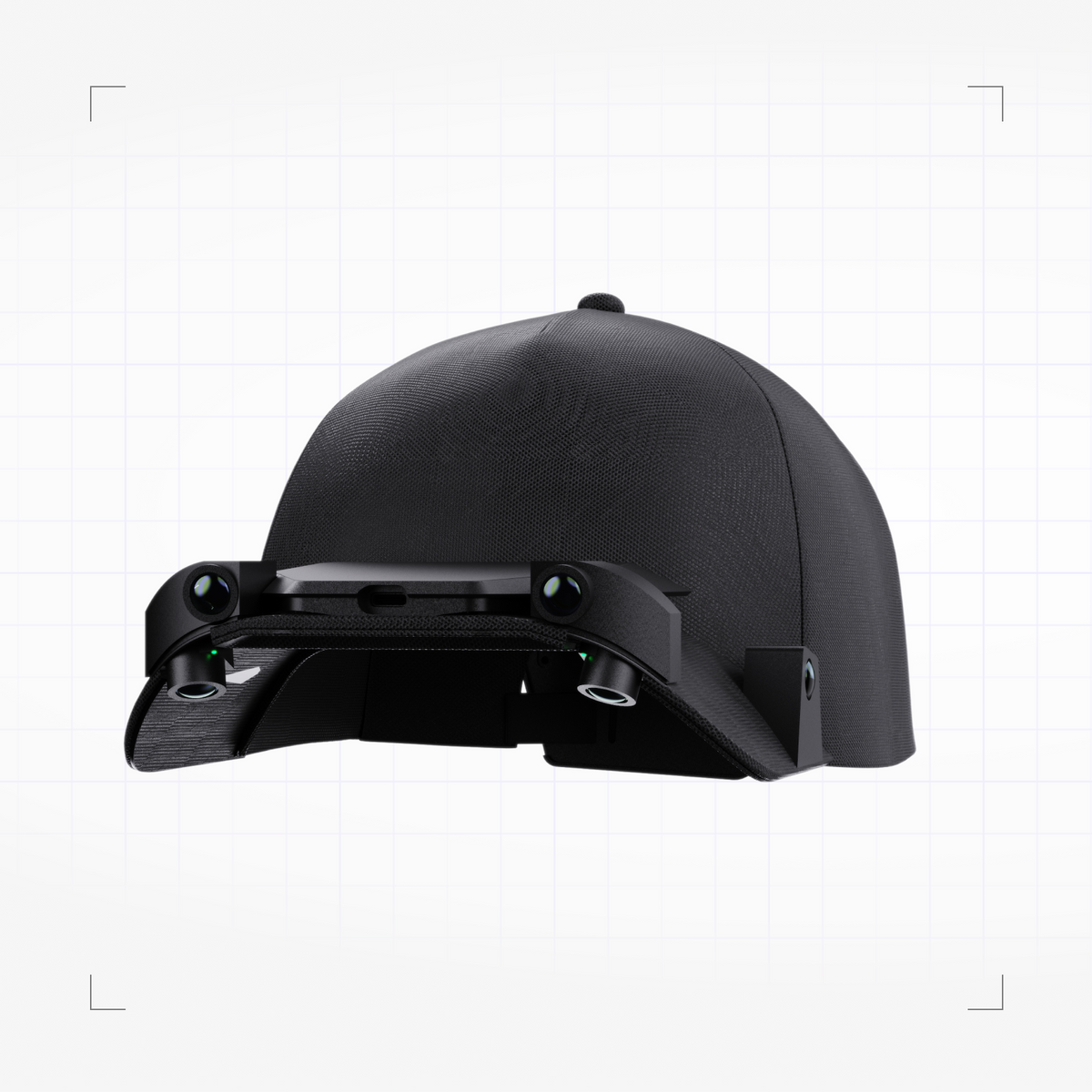
RoboCap is developed by FrodoBots and sold through the BitRobot ecosystem; those names do not represent separate manufacturers for this comparison.3 The rolling-shutter version combines six cameras—four for the surroundings and two downward-facing—with two 6-DoF IMUs. Its appeal is inexpensive-looking multi-view coverage paired with a relatively legible file contract, rather than a claim to directly measure a complete human skeleton.15
The advertised video mode is 1080p at 30 fps, with 200 Hz inertial sensing.315 Native sessions contain six MP4 camera files and SQLite .db files for the IMUs. The first-party converter documents segment-based filenames and converts those recordings into MCAP with camera, camera-info and IMU topics plus session metadata. Optional RoboWrist recordings add two wrist views and their inertial files.8222
That is useful for auditing data synchronisation: the format describes video clock offsets, packet timing and device-monotonic IMU timestamps instead of leaving alignment to filenames alone.82 It still needs an end-to-end test with actual recordings. This review inspected the file contract and converter code, not a downloaded RoboCap session. SLAM, hands and depth offered through the separate enrichment path are algorithmic additions, not proof that the native recorder saves those quantities.15
The US$799 price is a conditional GSI Exclusive Launch offer, shown against US$899, with code/limited-stock terms and an early-October 2026 shipment promise. Regular RS orders are described as shipping at the end of October.15 The global-shutter preorder is not a substitute for confirmed RS availability: its page contains conflicting total prices and a later shipment schedule, so obtain written terms rather than selecting whichever number looks best.16
Also budget the external power system. The manual specifies a 5 V/3 A power bank and supplied cable, with roughly five to five-and-a-half hours from a 10,000 mAh pack. Its small internal backup is not an all-day battery.12 For a cost-sensitive pilot, RoboCap is worth comparing with DAS Ego, but purchase timing and a real sample are prerequisites to any fleet recommendation.
Panoculon: Trinet
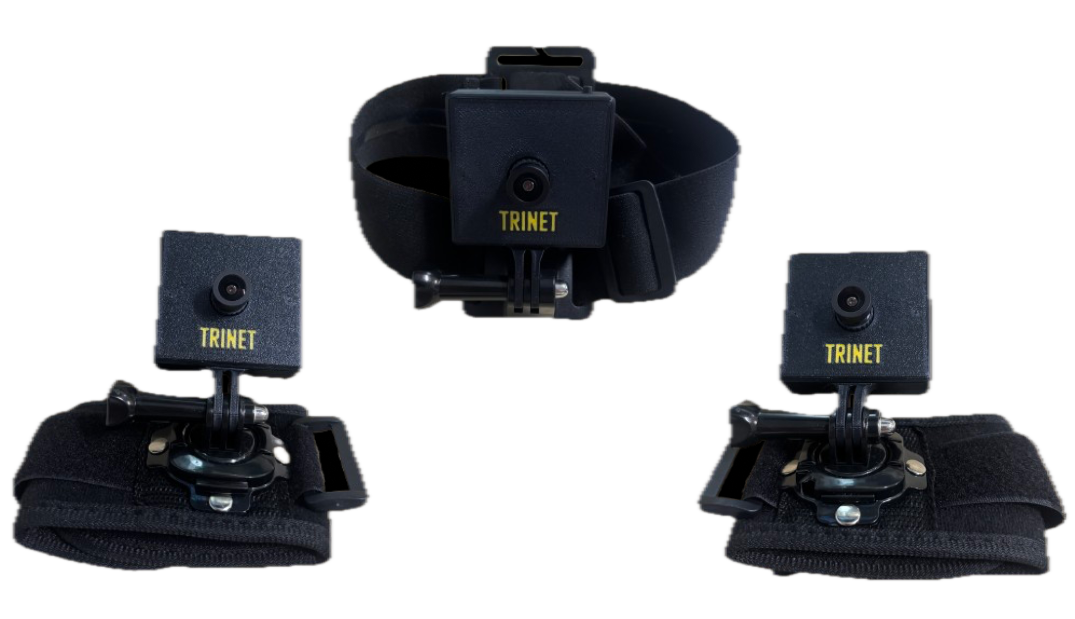
Panoculon takes a smaller-recorder approach. The current Trinet page specifies FHD recording at 30 fps, a 150° horizontal field of view, a 400 Hz 9-DoF IMU and a 40 g device. Its Wrist Cam Kit explicitly includes one head-mounted camera, two wrist cameras and the mounts, which makes it a qualifying integrated collection system rather than a camera that merely happens to be wearable.2
There are two acquisition paths. Over USB, Trinet presents standard UVC video with IMU samples and hardware timestamps carried in-band, extracted through Panoculon's SDK. Alternatively, it records onboard to microSD using an external power bank, without a host computer during capture. Stereo AAC audio and a hardware microphone mute are documented.2 That combination is attractive for a distributed pilot where collectors should not need to operate a computer while working.
Timing claims need to stay at the correct level. Panoculon describes microsecond-scale camera/IMU timing inside a recorder, but approximately 1 ms typical wireless cross-camera synchronization for the wrist kit. The latter is the relevant claim when aligning the head with both wrists; it should not be replaced by the smaller within-device figure.2
The Trinet Stereo variant uses two cameras with a 70 mm baseline and a shared electrical trigger. Its existence does not establish that the mono Trinet's recording mode is the stereo mode, or that every kit exports an already computed depth map.2 Ask for the exact stereo recording and reconstruction path if metric depth data is required.
The unresolved piece is the handoff. The reviewed public material describes the SDK and storage modes but does not establish a downloadable recording schema, video bitrate or worked sample. Pricing is by inquiry. Even the advertised 32-hour endurance on a 10,000 mAh power bank is a vendor claim, not measured performance here.2 I would put Trinet on the shortlist for head-plus-wrist visual demonstrations, conditional on proving that its compact capture workflow produces files your team can ingest without private tooling surprises.
Lumos: Ego STD and Lite
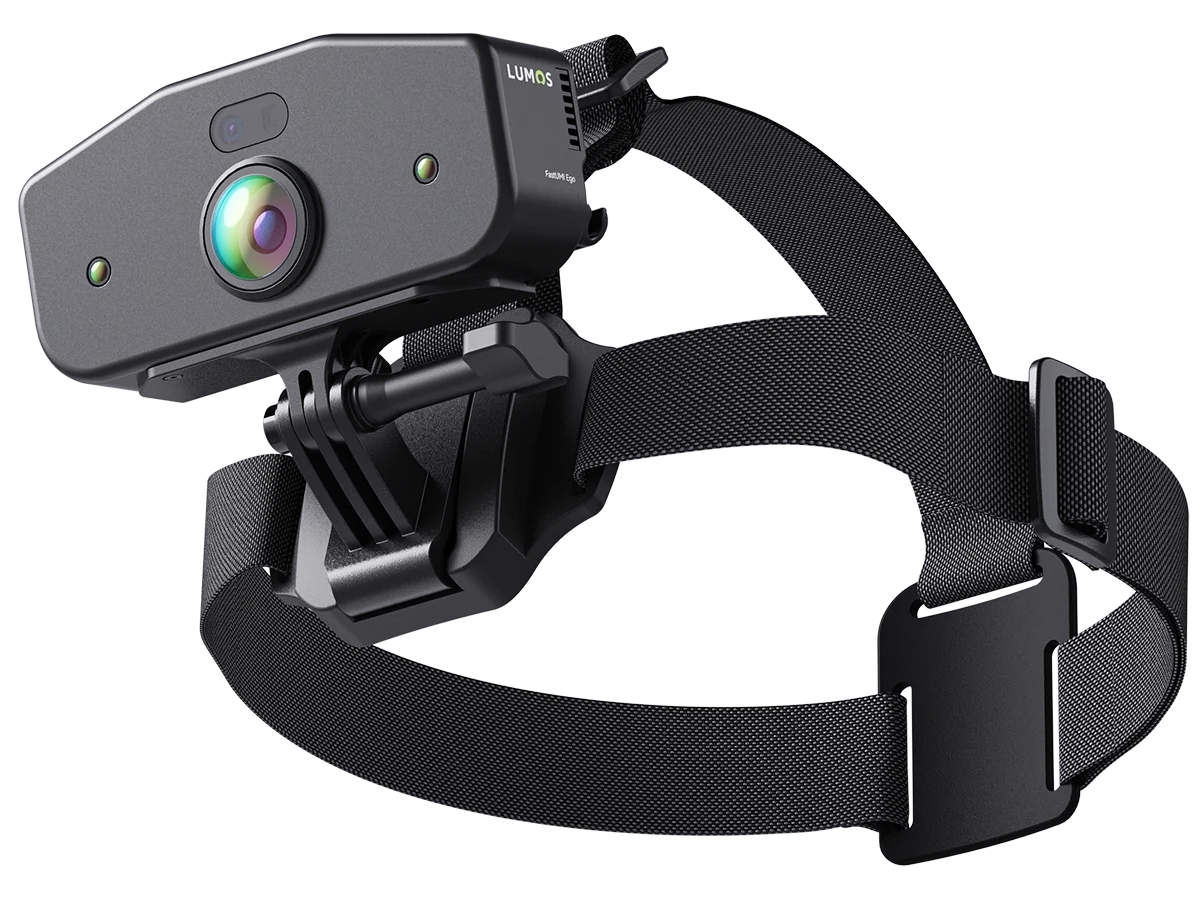
Lumos offers a more explicitly spatial collection device: wide-angle RGB, four SLAM cameras, inertial sensing and hand-joint tracking, with a ToF depth camera on STD only. Its page describes PC-host or FastUMI Go workstation operation, Ubuntu 20.04 support, ROS/ROS2 and automation scripts. It is an integrated head-mounted collection offering, but not a self-contained recorder whose entire system weight can be reduced to the headset.1
The published sensor-module specifications are RGB 1280 × 1280 at 60 ± 1 fps, four 640 × 480 SLAM cameras at 30 fps and a 500 Hz six-axis IMU. STD's ToF module is 320 × 240 at 30 ± 1 fps. Lumos claims microsecond-level hardware timestamp alignment and lists USB 3.2 Type-C at 10 Gbps.1 These are promising inputs, but no inspected saved-file profile establishes that every modality reaches storage simultaneously at those rates.
For close-range manipulation, STD is the more relevant candidate when explicit depth sensing matters; Lite avoids that hardware when the task can use RGB and estimated spatial information. Both require scrutiny of the hand labels. The page alternates between “more than 42” and “42” keypoints across both hands and mentions confidence scores. Rather than treating the count as settled, ask for the joint naming, reference frames, confidence semantics and a recording with real occlusions.1
The listed 235 g weight and sub-4 W maximum device power are useful for planning, not complete system figures. Host compute, power and storage remain part of the deployment, while the public page does not establish the native container, compression settings or export schema.1 Pricing goes through the purchase/partnership channel.6 Lumos makes most sense for a team comfortable evaluating a robotics SDK and a host-based acquisition setup, not one shopping solely for the easiest unattended recorder.
Virdyn: VDEgo-C2

Virdyn's C2 is worth considering for its collection workflow rather than for a numerical camera advantage that the public evidence does not establish. It is an all-in-one binocular head-worn recorder with local microSD storage, physical start/stop control and a wireless browser interface. The product is explicitly offered for egocentric human demonstrations, not just as Virdyn's separate data-collection service.9293
The vendor organizes capture by semantic task, with each task producing a package. A collector can record locally and upload afterward, or use advertised simultaneous upload. The Web UI provides preview, recording control, storage status and file management. Upload options include the vendor cloud and a local LAN server.93 For a factory pilot with restricted outbound data, that local-server option is a reason to investigate—not an automatic security certification.
The export contract has a dependency to price in: Virdyn describes a custom compressed package and a dedicated Decompression API. The extracted contents include MP4/H.265 video, timestamped IMU, audio, image timestamps and camera/IMU calibration; trajectory reconstruction uses a proprietary offline tool.93 Obtain an offline package, decompressor and license before treating the data as portable. Sensor calibration is useful only if the fields and camera models can be interpreted outside the preview application.
The public material reviewed does not establish C2's numerical saved resolution, video fps or IMU sampling rate. A site-wide “4K” dataset-service claim is not a C2 recording specification.9293 The listing displays US$1,100, alongside a US$1,500 comparison price, while the site banner calls C2/C4 a presale.93 It belongs in an operational pilot shortlist, with mode, delivery and software-access questions resolved before purchase—not in a confidently ranked fps chart.
Looper: Insight Data Acquisition Package
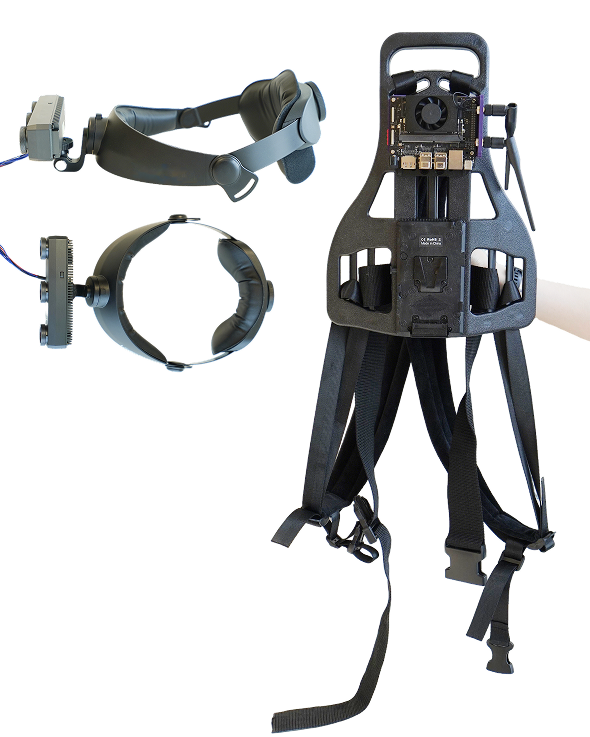
Looper is the clearest example of why “integrated” need not mean “all electronics on the head.” The Insight Data Acquisition Package combines a head camera, two hand cameras, a Jetson Orin NX, NVMe storage, a V-Mount battery backpack, mounts and Ubuntu/ROS 2 acquisition software. The page recommends Insight 9 or 7 for the head and Insight 7 or 3 for the hands; these are configuration choices inside one wearable package.94
The system is designed to save synchronized RGB, depth, IMU and VIO pose, with ROS 2 bags, images, depth maps, poses and metadata stored on the SSD. Its post-processing description includes multi-camera coordinate alignment, clip editing, trajectory scoring and optimization.94 For a team already using ROS 2, that is a more recognizable acquisition boundary than a custom cloud-only delivery format.
I would consider this architecture for bimanual manipulation such as assembly or cleaning, where a head view can miss the contact region and both near-field views matter. The trade is physical complexity: the backpack, compute and power are part of the system, not optional accessories to ignore when judging collector comfort. Camera-derived VIO and optimized trajectories also remain estimates; Looper's description of scoring and smoothing is not a measured error bound.94
The package page leaves consequential procurement details open: numerical simultaneous recording modes, total worn weight, battery endurance, SSD capacity and full price. It provides a brochure/inquiry route rather than a fully priced immutable SKU.94 Request a fixed bill of materials and a multi-camera bag from that exact configuration. Standalone Insight camera specifications would not answer whether the entire backpack rig sustains the same throughput.
Orbbec: the EGO collection kit
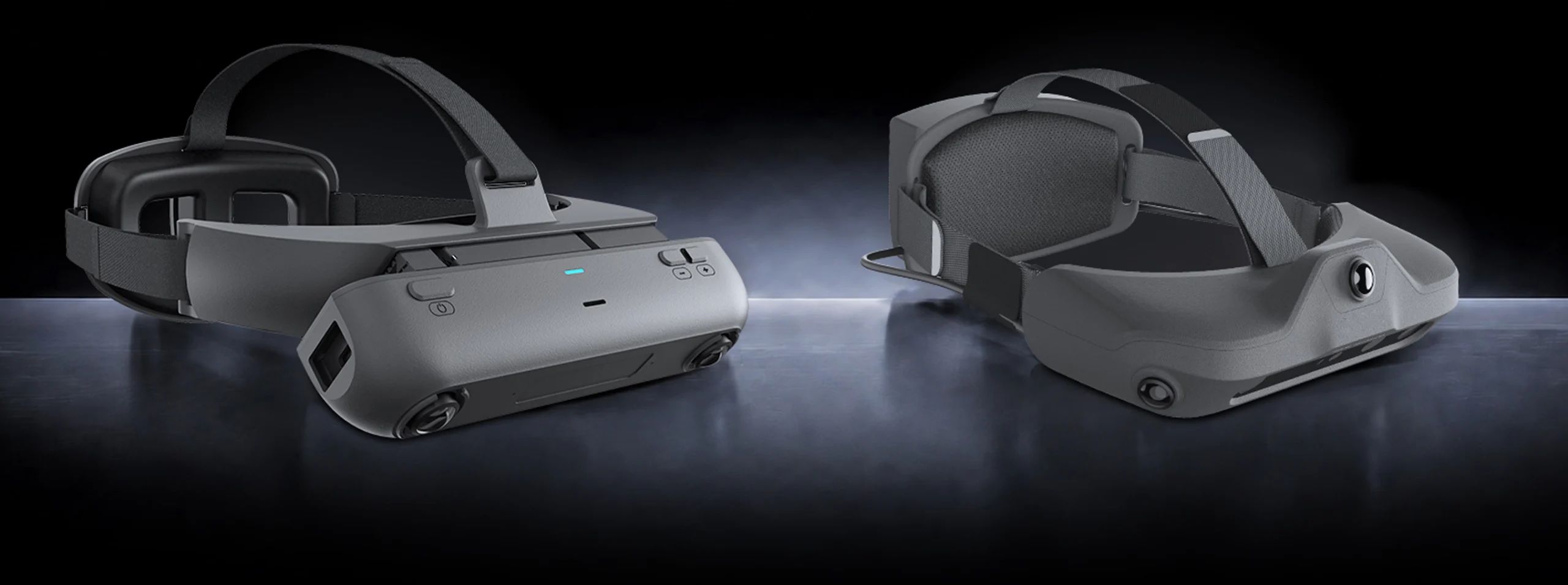
Orbbec qualifies here through its documented wearable EGO devices and standard robot-free collection kit, not through a bare depth-camera module. The platform offers Dual-EGO and Quad-EGO RGB configurations, an RGB-D EGO option and companion WristCam or handheld collection hardware. It also advertises contract and joint-design manufacturing for teams requiring a different wearable layout.95
The published Dual-EGO specification is two 2 MP fisheye cameras at 1600 × 1200 and 60/30 fps, a 120 mm baseline and a 6-axis IMU at 400/1000 Hz. Quad-EGO lists four cameras with the same resolution/rate choices and IMU settings of 400/800/1000 Hz. Orbbec claims synchronization within 1 ms; the Dual is listed at 200 g and the Quad below 400 g including battery.95 These are configuration specifications, not a sample-verified matrix of saved codecs and simultaneous stream rates.
Orbbec additionally reports an eight-hour continuous stereo RGB EGO test with approximately 30/60 fps video and 400/1000 Hz IMU sampling. That is vendor-reported capture evidence, not an independent test and not an eight-hour battery-life rating.95 It is worth asking for the test's power source, enabled streams, dropped-frame statistics and corresponding files.
The platform describes SDK/API access, camera parameters and timestamps, on-device application deployment and project-specific recording/export support. It does not establish an EGO-specific native container, codec or end-user storage workflow on the reviewed page. Depth should be attributed only to configurations equipped for it, not every RGB EGO kit.95
This is a sensible vendor conversation for a team procuring a repeatable custom collection platform, especially if head and wrist hardware must share calibration and manufacturing requirements. It is less clearly a ready-to-order research appliance: price, availability and final form need confirmation, and Orbbec explicitly says illustrated products may vary with final specifications.95
Tobii: Pro Glasses 3
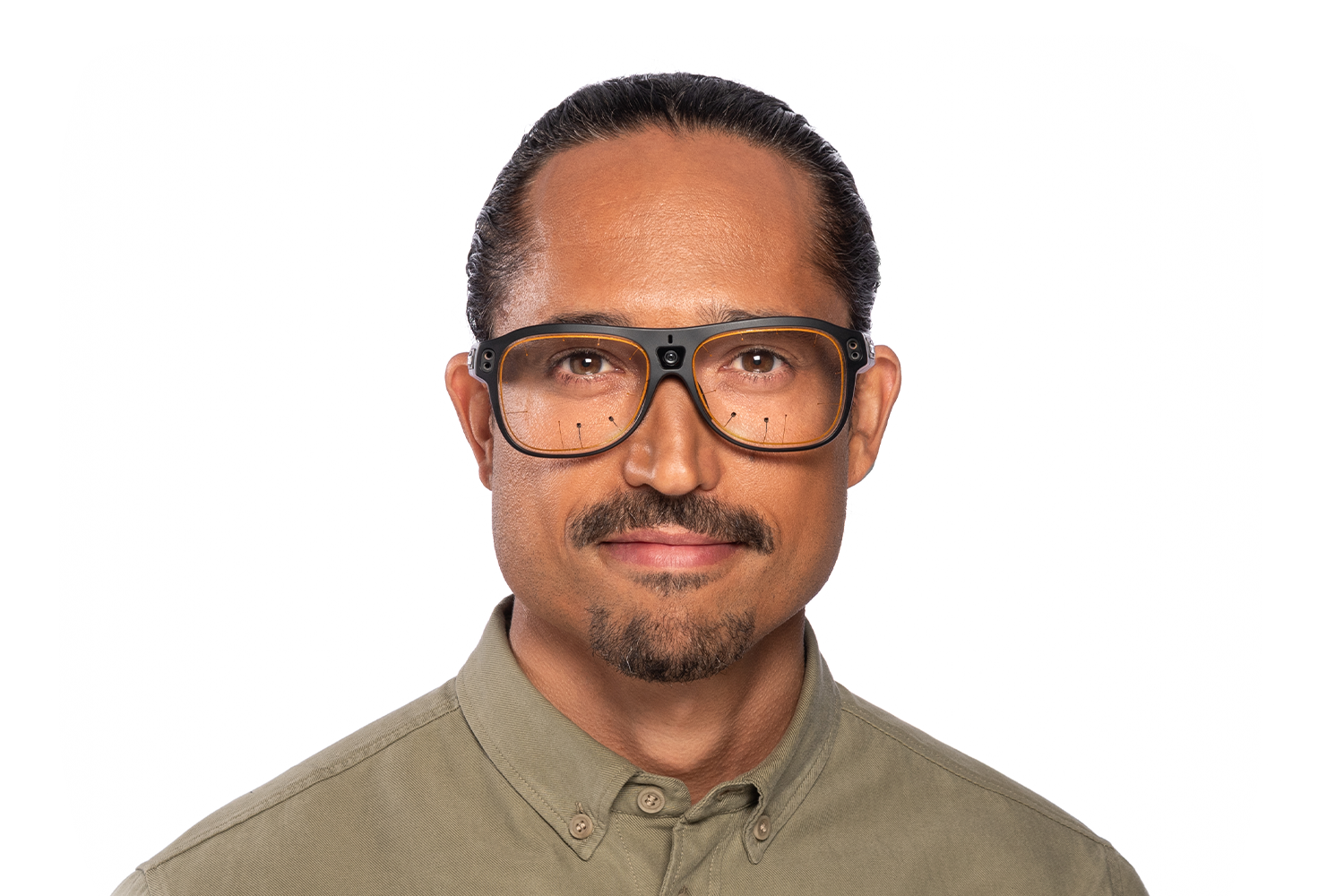
Tobii Pro Glasses 3 belongs in a different buying conversation: the question is where the demonstrator looks, not how many scene cameras fit on a cap. It combines an eye-tracking head unit, body-worn SD recorder and controller app. The documented scene mode is 1920 × 1080 at 25 fps, H.264—not 30 fps. Gaze is 50 or 100 Hz depending on edition; the 100 Hz edition can select either rate.104127
The system also records accelerometer and gyroscope data at 100 Hz, magnetometer data at 10 Hz and mono audio.104 A higher gaze rate does not create additional scene-video frames; a training pipeline must align the gaze samples to the video timeline rather than pretending both have the same cadence.
The file structure is unusually concrete. recording.g3 is a JSON manifest describing related files, including scenevideo.mp4 and gazedata.gz. The latter is gzip-compressed text with one JSON object per line. The developer guide says gaze, event and IMU timestamps correspond to video timestamps, and provides access through an HTTP API as well as live streaming interfaces. Once recording starts, data goes to SD without requiring a continuing network connection to the controller.127
There is device-specific robot-learning evidence, too. Where Do Humans Look When Demonstrating to Robots? uses Pro Glasses 3 across demonstration conditions and studies gaze-augmented learning. Importantly, it reports that some device-induced gaze patterns can hurt policy performance relative to a non-gaze baseline.119 Gaze is therefore a hypothesis to test with an ablation, not a premium sensor that automatically improves the model.
Tobii lists a 76.5 g head unit including cable, a separate 312 g recording unit and 105 minutes of battery recording time.104 Pricing is by quote; the controller is included and the API is free, while Pro Lab is additional analysis software.104105 The API guide references a Research Use development license, so confirm commercial integration rights explicitly.127 Choose it for attention-aware demonstrations or controlled gaze experiments, not as a substitute for hand geometry or contact sensing.
Pupil Labs: Neon

Neon combines an eye-tracking module in a wearable frame with a USB-C companion phone. Its scene camera records 1600 × 1200 at 30 Hz, with a 103° × 77° field of view. Two eye cameras each record 192 × 192 images at 200 Hz; their hardware-synchronized images are concatenated into one 384 × 192 stream. The IMU is sampled at 110 Hz, and stereo audio can be included in the scene video but is disabled by default.116
The qualification behind the familiar 200 Hz gaze claim matters. Real-time gaze processing depends on the phone, heat and other running applications; older devices may fall below the full rate. Pupil Cloud recomputes gaze at 200 Hz when required after upload.116 A dataset labeled “200 Hz” should say whether that means acquired eye images, live estimates or postprocessed gaze. For offline-only deployment, establish what the chosen phone computes locally rather than assuming later cloud enrichment is available.
Neon offers CSV/MP4 exports through Pupil Cloud or the offline Neon Player, plus native binary recordings accessible via USB or Cloud and the pl-neon-recording library. Documented exports include info.json, scene_camera.json, gaze.csv, imu.csv, video timestamps and eye-movement event files.109110 This makes it attractive when a team wants to work directly with gaze and video rather than depend on a proprietary visualization tool.
The GazeVLA paper provides a direct example of Neon in robot-learning data collection, recording egocentric video and gaze for additional human demonstrations. Its hand trajectories come from HaWoR processing.114 Likewise, Neon's inertial orientation should not be inflated into verified native six-degree-of-freedom world translation or depth: the stream documentation describes acceleration, angular velocity and fused orientation.116
The official page advertises systems from €6,250, or €5,515 academic; the Just act natural configuration is listed at €6,250 in the shop.107117 That frame is 50 g including the module, but the phone and cable add worn hardware. Published companion-device recording times of four hours at 200 Hz and eight hours at 30 Hz refer to gaze-processing settings, not alternative scene-video frame rates.108 Confirm the phone and all accessories in the delivered quote. Compared with Pro Glasses 3, Neon offers a different scene cadence and phone-based workflow; the meaningful comparison is which setup maintains usable gaze throughout your task, not simply 200 versus 100 on a spec sheet.
Choose by the task you need to teach
Natural tabletop demonstrations with a research pipeline. I would begin with Aria if partner access is realistic and the team wants a predefined multimodal profile with established tools. DAS Ego is the alternative to investigate when multiple head-mounted views and inspectable MCAP are priorities. Aria offers a clearer supported profile; GenRobot offers a useful public sample but requires the schema/version checks described above.1004 Neither choice removes the need to decide how human motion becomes robot supervision.
Assembly, packing or cleaning where the hands obscure the work. Prioritize a head-plus-near-field pilot: Trinet's wrist kit for a compact recorder architecture, Looper for a host-backed RGB/depth/pose workflow, and Orbbec when the project can justify a configured kit or hardware-development relationship.29495 Put both hands into the most occluded part of the task before judging the footage. More views only help if the useful contact region is visible and the views can be aligned.
Close-range work needing explicit depth and hand estimates. Lumos Ego STD deserves a pilot, provided the actual saved depth mode and label quality are demonstrated; Lite should not inherit STD's ToF capability in a purchasing comparison.1 Compare against the chosen Looper or Orbbec depth-equipped configuration using your objects and lighting, not depth-camera specifications detached from the wearable rig.9495
Cost-sensitive visual-data collection. RoboCap RS has a concrete public launch price and an open conversion path, but the attractive price is conditional and shipment is prospective.1522 Virdyn has a displayed device price and an operator-oriented recording workflow, with more uncertainty about numerical modes and decompression access.93 I would compare them on cost per accepted, ingestible task episode after a pilot, not call either the cheapest complete training-data system.
Attention-conditioned policies or studies of expert intent. Put Pro Glasses 3 and Neon on the same task. Their original robot-learning studies make gaze a defensible research signal, but also show why how the demonstration is collected matters.119114 Measure valid gaze coverage and train a no-gaze baseline. Keep scene-video rate, eye-image rate and gaze-estimation rate separate in the data loader.
Long shifts or sensitive workplaces. Favor whichever pilot proves the complete operational loop: comfortable wearing, power changes, recoverable files, local transfer and permissions for every recording location. Virdyn documents LAN deployment, Trinet onboard recording without a host, and RoboCap operation from an external power bank; each is a useful property, not proof of a secure, interruption-free shift.93212 Ask separately about consent, audio, bystanders, retention and any cloud processing. “Records offline” and “never needs external processing” are different requirements.
The acceptance recording before a fleet order
The most revealing purchasing deliverable is a recording from the exact firmware, configuration and software license proposed in the quote. Ask the vendor to perform a representative task, including a difficult moment: both hands inside a box, a reflective utensil, a fast turn, a pause and a restarted session. This is a proposed acceptance procedure, not a test performed for this article.
- Recover the files without the sales demo. Use the intended local or cloud path, retain the native package and confirm that your own machine can read every required stream. Record software versions and any paid or account-gated dependency.
- Count and decode the saved frames. Check dimensions, codec, timestamps, gaps and session boundaries. Compare measured cadence with the selected recording profile, not with the camera's maximum capability.
- Separate capture from inference. Inventory raw video, IMU and calibration independently of estimated gaze, hands, depth and trajectories. For each derived field, record the generating algorithm/version and failure or confidence indicators.
- Verify spatial and temporal meaning. Establish units, coordinate frames, intrinsics, extrinsics and timestamp origins. Test the alignment of head and wrist views instead of accepting a single unqualified synchronization number.
- Preserve every required view during conversion. If the target is a training format such as LeRobot, compare the converted episode with the original. A converter that writes a file successfully may still omit cameras, calibration or quality flags.
- Exercise the operating procedure. Check the permitted power-change method, transfer time, storage limits and recovery after a normal stop/restart. Do not induce faults that the manual warns can damage recordings.
- Price the usable system. Include mounts, phones or hosts, batteries, storage, software, inference, failed collection time and the commercial rights needed for your use—not just the visible headset.
GenRobot's sample illustrates why this gate is worth the effort: camera decoding can succeed while other schemas fail and documented hand topics are missing. Aria's profiles illustrate the complementary lesson: supported simultaneous settings can be more valuable than higher isolated sensor maxima.83100
Buy the configuration whose recordings survive that process and supply the supervision your task actually needs. If the handoff cannot yet be demonstrated, keep it a pilot—even when the wearable itself looks ready.
Sources
Numbered links point to the first-party documentation, code, sample files and original research used above.
- [1] Lumos Ego STD & Lite | Lumos Robotics
- [2] Trinet - Egocentric Data Collection Device | Panoculon Labs
- [3] RoboCap
- [4] DAS Ego Manual v2.0 | GenRobot AI
- [6] Purchase Inquiry
- [10] DAS Ego Data Introduction | GenRobot AI
- [12] How to Use RoboCap | Help Center
- [15] RoboCap – Egocentric Vision Headset for Robotics & AI Research – BitRobot
- [16] RoboCap – Egocentric Vision Headset for Robotics & AI Research – BitRobot
- [17] DAS Ego - GenRobot AI - Genrobot AI Platform for Robotics
- [18] Purchase - GenRobot AI - Genrobot AI Platform for Robotics
- [20] genrobot_datakit
- [22] robocap_converter
- [82] robocap_docs_format.md
- [83] DAS Ego official sample MCAP
- [92] vdego
- [93] virdyn
- [94] looper
- [95] orbbec
- [100] Profiles | Project Aria Docs
- [101] Recording Control | Project Aria Docs
- [102] EgoVerse: An Egocentric Human Dataset for Robot Learning from Around the World
- [104] Advanced wearable eye tracker built for research - Tobii
- [105] Wearable eye tracker application | Download for free - Tobii
- [107] Neon - Overview - Eye tracking for research and beyond
- [108] Neon - Technical Specifications - Neon eye tracking module and frames
- [109] Neon - Recording Format - Pupil Labs Docs
- [110] Neon - Neon Recording API - Pupil Labs Docs
- [112] Project Aria Research Kit | Project Aria
- [113] EgoMimic: Georgia Tech PhD student uses Project Aria Research Glasses to help train humanoid robots
- [114] GazeVLA: Learning Human Intention for Robotic Manipulation
- [116] Neon - Data Streams - Pupil Labs Docs
- [117] Neon - Shop - Configure and purchase Neon eye trackers
- [119] Where Do Humans Look When Demonstrating to Robots?Human Gaze Behavior in Pick-and-Place TasksAcross Demonstration Devices
- [127] Tobii Pro Glasses 3 developer guide
- [129] Export Gen2 On-device Machine Perception data to CSV | Project Aria Docs